

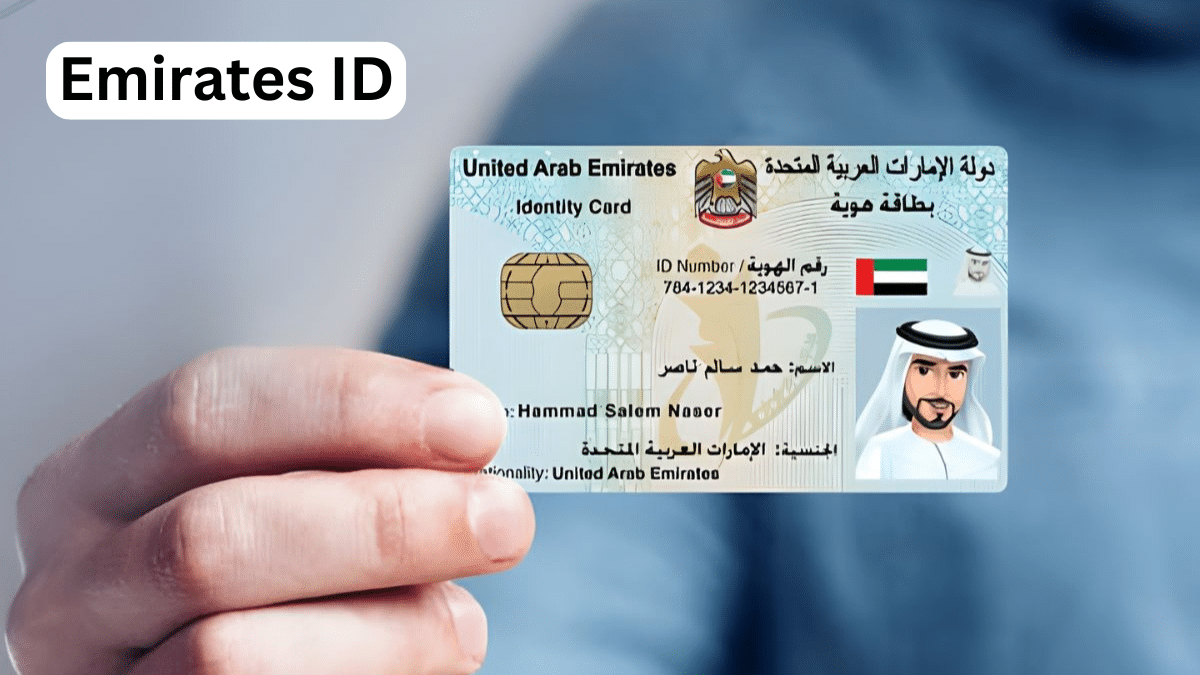
If you’re living in the UAE or planning to move here, you’ll quickly discover that the Emirates ID is more than just an identity card. It’s your key to everyday life in the country. From opening a bank account to renting an apartment, getting a mobile connection to accessing healthcare services, this small card unlocks nearly everything you need.
But navigating the Emirates ID process can feel overwhelming, especially if you’re new to the UAE. What exactly is it? How do you get one? Can you download a digital version? What happens if you lose it?
This guide answers all your questions about the Emirates ID in clear, straightforward language. We’ve verified every detail with official government sources, so you can trust the information you’re reading.
What Is the Emirates ID?
The Emirates ID is the official government-issued identity card for everyone living in the UAE. Issued by the Federal Authority for Identity, Citizenship, Customs and Port Security (ICP), it’s a mandatory document for UAE nationals, GCC citizens, and all expatriate residents.
Think of it as your digital passport to life in the Emirates. This biometric smart card contains your personal information, photograph, fingerprints, and a unique 15-digit identification number stored on an embedded chip. This number stays with you permanently, even when you renew or replace your card.
The Emirates ID system started in 2004, but the government introduced significant upgrades in 2021. Today’s cards feature enhanced security with polycarbonate material designed to last 10 years or more, 3D laser printing, and a high-capacity chip that can store up to 32,000 characters of encrypted data.
Is Emirates ID the Same as a Visa or Residence Permit?
This is one of the most common questions expatriates ask, and the answer is important to understand.
No, the Emirates ID is not a visa or residence permit itself. However, it’s issued after you receive your residence visa. You cannot get an Emirates ID without first having legal residency status in the UAE.
Here’s how it works: Once your residence visa is approved and stamped in your passport, you then apply for an Emirates ID. The card’s validity matches your visa duration. For expatriates, this is typically two or three years, though Golden Visa holders may have 10-year validity.
The Emirates ID serves as proof of your residency and contains your visa information on its chip, which is why immigration officials and government departments can verify your status by scanning your ID.
Why Do You Need an Emirates ID?
Your Emirates ID is essential for almost every aspect of life in the UAE. You’ll need it for:
Banking and Finance
Opening a bank account, applying for credit cards, or securing loans all require your Emirates ID. Banks use your ID number to verify your identity and link your financial records.
Housing and Utilities
Landlords and real estate agencies require a valid Emirates ID to sign rental contracts. You’ll also need it to register for utilities like electricity (DEWA in Dubai, ADDC in Abu Dhabi) and water services.
Healthcare
Your Emirates ID connects to your health insurance and medical records. Hospitals and clinics use it to access your insurance coverage and medical history.
Telecommunications
Getting a mobile phone connection or internet service requires Emirates ID verification. Telecom providers use it to register your account.
Government Services
From renewing your driving license to accessing digital platforms like UAE Pass, your Emirates ID is required for all government transactions.
Travel
UAE nationals can use their Emirates ID for travel within GCC countries. All residents can use it at airport e-gates for faster immigration processing.
Business and Employment
Employers need your Emirates ID for official records, and it’s required if you’re setting up a business in the UAE.
The bottom line? You should carry your Emirates ID with you at all times. It’s a legal requirement, and you may need to present it for verification in various situations.
Who Needs to Get an Emirates ID?
Simply put: everyone living in the UAE needs one.
This includes:
- UAE nationals (all ages, including children and infants)
- GCC nationals residing in the UAE
- Expatriate residents holding valid residence visas
- Dependents and sponsored family members
- Children (yes, even babies need their own Emirates ID linked to their parent’s sponsorship)
The only people who don’t need an Emirates ID are tourists and short-term visitors on visit visas. If you’re staying for less than three months on a tourist visa, you won’t apply for one.
How Much Does an Emirates ID Cost in 2026?
The cost varies depending on your nationality and how long your visa is valid. Here’s the breakdown based on current official fees:
For Expatriate Residents:
The standard rate is AED 100 per year of validity, plus service fees.
- 1-year validity: Approximately AED 170 total (AED 100 card fee + AED 40-70 service fee)
- 2-year validity: Approximately AED 270-300 total (AED 200 card fee + service fees)
- 3-year validity: Approximately AED 370-400 total (AED 300 card fee + service fees)
For UAE Nationals and GCC Nationals:
- 5-year card: AED 100 card fee + AED 50 service fee (approximately AED 150 total)
- 10-year card: AED 200 card fee + AED 50 service fee (approximately AED 250 total)
Additional Fees:
- Typing center service fee: AED 30-70 (if you apply through a typing center instead of online)
- Online application: AED 40 (if you apply directly through the ICP website or app)
- Urgent “Fawri” service: Additional AED 150 for 24-hour processing
- Lost or damaged card replacement: AED 300 + application fees
These fees are set by the Federal Authority for Identity, Citizenship, Customs and Port Security and may change. Always verify current fees on the official ICP website (icp.gov.ae) before applying.
How to Apply for Your Emirates ID: Step-by-Step
Getting your Emirates ID is straightforward once you understand the process. Here’s how it works:
Step 1: Ensure You Have a Valid Residence Visa
You must have an approved residence visa before applying for an Emirates ID. The ID application typically happens after your visa is stamped in your passport and you’ve completed your medical fitness test.
Step 2: Submit Your Application
You have several options for applying:
Online Application (Recommended):
- Visit the official ICP website (icp.gov.ae)
- Download the UAEICP mobile app (available on iOS and Google Play)
- Log in using UAE Pass or create an account
- Fill in the application form with accurate information
- Upload required documents (passport copy, photograph, visa details)
- Pay the fees online
Through Typing Centers:
Many residents prefer using authorized typing centers, especially if they’re not comfortable with online applications. The typing center will handle the paperwork for you, though this adds an extra service fee of around AED 30-70.
At ICP Customer Happiness Centers:
You can visit any ICP center in person to submit your application. This is helpful if you have questions or need assistance.
Step 3: Biometric Appointment
If you’re applying for the first time or if it’s been years since your last biometrics, you’ll need to visit an ICP service center for fingerprinting and photograph capture. You’ll receive an SMS with your appointment details.
Important: Biometric appointments are mandatory for applicants aged 15 and above. Children under 15 only need a photograph.
Step 4: Wait for Processing
Standard applications take 7-10 working days to process. You’ll receive SMS updates about your application status.
Step 5: Receive Your Card
Once ready, your Emirates ID is delivered by Emirates Post or Zajel courier to your registered address. You’ll get an SMS notification when it’s dispatched and when it’s ready for collection or delivery.
Emirates ID Photo Requirements
Getting your photo right is important to avoid application delays. Here are the official requirements:
- Size: 35mm wide x 40mm high (standard passport photo size)
- Background: Plain white
- Quality: High resolution, printed at 600 DPI
- Appearance: Recent photograph with neutral expression
- Head position: Straight, facing forward, eyes open
- Glasses: Medical glasses are allowed if you wear them regularly
- Head coverings: Religious head coverings are permitted, but your face must be fully visible
- No accessories: Remove sunglasses, hats, or other accessories (except religious headwear)
Most typing centers and ICP service centers have photo services available if you don’t have a suitable photo.
Can You Get a Digital Emirates ID?
Yes! The UAE has made digital Emirates ID accessible through several official channels. This is incredibly convenient when you don’t have your physical card with you or if it’s being renewed.
Method 1: UAE Pass App
The UAE Pass is the official digital identity platform for the UAE. Download the app, register using your Emirates ID number, and verify your identity through facial recognition. Once verified, you can access your digital Emirates ID directly in the app.
Method 2: UAEICP App
Download the UAEICP app and log in using your UAE Pass credentials. Navigate to the Emirates ID section, and you’ll see your digital card. You can also download it as a PDF for offline access.
Method 3: Apple Wallet (iPhone Users)
If you use an iPhone, you can add your Emirates ID directly to Apple Wallet through the UAEICP app for quick access.
Method 4: QR Code
If your physical card is expired or still being processed, you can generate a temporary QR code through the UAEICP app. This code contains all your Emirates ID details and can be scanned by government departments and organizations for verification.
Important note: While the digital Emirates ID is accepted for most services (banking, telecom, government services), some situations still require the physical card, particularly at border control, airports, and certain official procedures. Always keep your physical card accessible.
How to Renew Your Emirates ID
Emirates ID renewal is linked to your residence visa status. Here’s what you need to know:
When to Renew
For UAE Nationals:
You can start the renewal process up to six months before your card expires, but you must renew at least one month before the expiry date.
For Expatriate Residents:
You can only renew your Emirates ID when you renew or reissue your residence visa. The two processes happen together.
Grace Period:
You have a 30-day grace period after expiry to renew your Emirates ID without penalties. After that, late fees apply.
Renewal Process
The renewal process is similar to the initial application:
- Apply online through the ICP website or UAEICP app
- Update your information if needed
- Pay the renewal fees
- Attend biometric appointment if requested (only if your data needs updating)
- Wait for processing (typically 7-10 working days)
- Receive your renewed card by post
Renewal Fees
Renewal fees are the same as initial issuance fees based on your visa validity period. However, if you’re only renewing the ID without changing visa duration, the fees may be lower.
What If You Lose Your Emirates ID?
Losing your Emirates ID can be stressful, but the replacement process is straightforward. Here’s exactly what to do:
Step 1: Report the Loss Immediately
Visit the nearest ICP Customer Happiness Center as soon as you realize your card is lost or stolen. This is crucial because reporting it immediately deactivates the lost card, preventing any potential misuse or identity fraud.
You can also report it through the UAEICP app if you prefer.
Step 2: Gather Required Documents
Bring identification documents to prove your identity:
- UAE Nationals: Valid passport and family book
- GCC Nationals: Valid passport and proof of UAE residency (employment certificate, business license, etc.)
- Expatriate Residents: Valid passport with residence visa stamp
For children under 15, parents should bring the child’s birth certificate and a passport-size photo with white background.
Step 3: Apply for Replacement
You can apply for a replacement:
- Online through the ICP website
- Via the UAEICP mobile app
- In person at any ICP Customer Happiness Center
Step 4: Pay the Replacement Fees
- Replacement fee: AED 300
- Application fee: AED 40 (online) or AED 70 (typing center)
- Optional urgent service: Additional AED 150 for 24-hour processing
Total cost: Approximately AED 340-470 depending on how you apply and whether you choose urgent service.
Step 5: Receive Your New Card
Standard replacement takes about 48 hours from the time you submit your application. If you opted for the express “Fawri” service, you’ll receive it within 24 hours.
Important: The replacement card will have the same expiry date as your lost card. You’re not getting a new validity period, just a replacement of the existing card.
Damaged Emirates ID: Do You Need to Replace It?
If your Emirates ID is damaged but still readable, you might wonder if replacement is necessary. The answer: yes, you should replace it.
A damaged card may not scan properly, which can cause problems at banks, government offices, airports, and other places that need to verify your information electronically. Even if the visible information is clear, damage to the chip makes the card invalid for official use.
The replacement process for a damaged card is identical to a lost card, including the fees. Make sure to bring the damaged card with you to the ICP center when reporting it.
Emirates ID Fines: What You Need to Know
Late renewal can result in significant fines, so it’s important to understand the penalty structure:
Late Renewal Fine:
- AED 20 per day after the 30-day grace period
- Maximum fine: AED 1,000
For example, if your Emirates ID expired on January 1st, you have until January 31st to renew without penalty. Starting February 1st, you’ll be charged AED 20 for each day of delay, up to a maximum of AED 1,000 (which would be reached after 50 days of delay).
How to Avoid Fines:
- Set a reminder to renew at least 60 days before expiry
- For expatriates, coordinate your visa renewal and Emirates ID renewal together
- Keep track of your expiry date (it’s printed on the front of your card)
- The ICP sends SMS reminders before expiry, but don’t rely solely on these
Checking for Fines:
You can check if you have any Emirates ID fines through the ICP website or app. Simply log in and navigate to the fine checking service.
Fine Exemptions:
In some cases, fines may be waived if you:
- Were outside the UAE for more than three months
- Had your visa canceled or were deported
- Were medically incapacitated
- Are 70 years or older and unable to visit the center
- Receive social welfare assistance
- Experienced an ICP system error that caused the delay
If you believe you qualify for an exemption, contact ICP customer service or visit a Customer Happiness Center with supporting documentation.
How to Track Your Emirates ID Application
Waiting for your Emirates ID can feel like a long process, but you can track your application status at any time.
Online Tracking Methods:
ICP Website:
- Visit icp.gov.ae
- Click on “Check Application Status” under Services
- Enter your Emirates ID number or Application Number (PRAN)
- View your current status
UAEICP Mobile App:
- Open the app and log in
- Navigate to “My Applications”
- View the status of all your applications
SMS Updates:
You’ll automatically receive SMS notifications at various stages:
- Application received
- Application under review
- Card printing
- Card dispatched
- Ready for collection
Tracking Delivery:
Once your card is printed and dispatched, you can track the delivery:
Emirates Post:
- Contact: 600-599-999
- SMS tracking available
- Online tracking on Emirates Post website
Zajel Courier:
- Some IDs are delivered via Zajel
- You’ll receive a tracking number via SMS
- Track online at Zajel website
What the Status Messages Mean:
- Under Review: Your application is being processed
- Pending Biometrics: You need to complete fingerprinting
- In Progress: Application approved, card being manufactured
- Printed: Your card has been produced
- Dispatched: Card is in transit to you
- Ready for Collection: Card is at the collection point
Standard processing takes 7-10 working days after biometric submission, though busy periods might extend this slightly.
Common Emirates ID Questions Answered
Can I travel with just my Emirates ID?
For UAE nationals and GCC residents, yes! You can travel to other GCC countries (Saudi Arabia, Kuwait, Bahrain, Oman, Qatar) using just your Emirates ID. However, for international travel outside the GCC, you’ll need your passport.
For expatriate residents, your Emirates ID is not a travel document. You must use your passport for all international travel, though your ID is useful for e-gates at UAE airports.
Can I use my Emirates ID for LinkedIn verification?
While LinkedIn and some platforms accept Emirates ID for identity verification, you’ll typically need to upload a clear photo or scan of your card. Always be cautious about sharing your ID online and only do so through secure, official verification processes.
Can someone misuse my Emirates ID?
Identity theft is a serious concern, which is why you should:
- Never share photos of your Emirates ID on public social media
- Only provide Emirates ID details to official, verified organizations
- Be cautious about websites asking for your ID number
- Report your card immediately if lost or stolen to prevent misuse
The good news is that Emirates ID has multiple security features including biometric data, making it difficult for someone else to use your card for official purposes.
Is Emirates ID mandatory for opening a bank account?
Yes, absolutely. Banks in the UAE are required by law to verify your identity using your Emirates ID. You cannot open a bank account, apply for credit cards, or access most financial services without a valid Emirates ID.
Do I need Emirates ID to rent an apartment?
Yes, landlords and real estate agencies require a copy of your Emirates ID to process tenancy contracts. This is standard practice across all emirates.
Can I get Emirates ID on a visit visa?
No. Emirates ID is only issued to residents with valid residence visas. Tourist or visit visas don’t qualify you for an Emirates ID. You must first convert to a residence visa (through employment, business ownership, family sponsorship, or other residency programs) before you can apply.
Can I get Emirates ID without a visa?
No, you cannot. The Emirates ID application is directly linked to your residence visa status. You must have an approved and stamped residence visa before the Emirates ID application process can begin.
Can I get Emirates ID on a freelance visa?
Yes! Freelancers with valid UAE freelance visas are eligible for Emirates ID. The application process is the same, and your ID validity will match your freelance visa duration.
When did Emirates ID start in the UAE?
The Emirates ID system was launched in 2004. However, significant upgrades were introduced in June 2021, including enhanced security features, better durability, and increased chip capacity.
Where is the UID number on my Emirates ID?
Your UID is a permanent 9-15 digit lifetime identifier, typically printed at the top of your residence visa sticker (in your passport, above the file number) or on your e-visa. It is not printed visibly on the Emirates ID card itself, though the card’s microchip may contain it.
Can I add Emirates ID to Samsung Wallet?
Currently, the official Emirates ID digital integration is primarily available through UAE Pass and the UAEICP app, with Apple Wallet support for iPhone users. Samsung Wallet integration may become available as the digital ID ecosystem expands. For now, use the UAEICP app or UAE Pass for digital access on Samsung devices.
How long does Emirates ID take after biometrics?
After completing your biometric appointment (fingerprinting and photograph), your Emirates ID typically takes 7-10 working days to be processed and delivered. During busy periods, this might extend slightly. You can track your application status online to see exact progress.
Emirates ID and UAE Pass: Understanding the Connection
UAE Pass is the UAE’s national digital identity platform, and it’s becoming increasingly important for accessing government services. Here’s what you need to know:
What Is UAE Pass?
UAE Pass is a secure digital identity system that allows residents and citizens to access over 5,000 government and private services through a single login. It’s essentially your digital key to all online UAE government services.
How Does It Connect to Emirates ID?
Your Emirates ID is required to register for UAE Pass. The app uses your Emirates ID number and biometric verification (facial recognition) to create your secure digital identity.
What Can You Do With UAE Pass?
- Access government websites and services with single sign-on
- View and download your digital Emirates ID
- Sign official documents digitally
- Complete government transactions online
- Access services from multiple government departments without repeated logins
How to Register for UAE Pass
- Download the UAE Pass app from iOS App Store or Google Play
- Enter your Emirates ID number
- Verify your identity using facial recognition
- Set up your security PIN
- Your account is ready to use
Alternatively, visit a UAE Pass kiosk at any ICP center or major mall for in-person verification.
Important Reminders
Before we wrap up, here are some crucial points to remember:
Carry Your Card Always
It’s a legal requirement to carry your Emirates ID at all times. While digital versions are convenient for certain situations, you should still have your physical card accessible.
Employers Cannot Keep Your Card
By UAE law, employers and companies cannot confiscate or retain your Emirates ID. They may take copies for their records, but they must return the original card to you immediately.
Start Renewal Early
Don’t wait until the last minute. Begin your renewal process at least 60 days before expiry to avoid any delays or potential fines.
Keep Your Information Updated
If you change your phone number, address, or other contact details, update them through the ICP portal or app. This ensures you receive important notifications about your Emirates ID.
Store a Digital Copy Safely
Keep a PDF copy of your Emirates ID stored securely on your phone or cloud storage. This can be helpful if you ever need to reference your ID number or information when you don’t have the physical card with you.
Protect Your Identity
Be cautious about sharing your Emirates ID number or photos of your card. Only provide this information to verified, official organizations.
Where to Get Help
If you encounter issues or have specific questions about your Emirates ID:
ICP Customer Service:
- Call: 600-522-222 (available 24/7)
- Email: Available through ICP website contact form
- Visit: Any ICP Customer Happiness Center across the UAE
Online Resources:
- Official ICP website: icp.gov.ae
- UAE government portal: u.ae
- Download UAEICP app for mobile services
In-Person Support:
ICP Customer Happiness Centers are located across all seven emirates. You can find your nearest center on the ICP website by searching for “Customer Happiness Centers” and filtering by your emirate and service type.
Final Thoughts
The Emirates ID is much more than a simple identification card. It’s your essential document for navigating life in the UAE, connecting you to banking, healthcare, government services, housing, and virtually every official transaction.
Understanding how to apply, renew, track, and protect your Emirates ID helps you avoid unnecessary delays, fines, and complications. With the UAE’s continued digital transformation, the Emirates ID has become even more accessible through platforms like UAE Pass and the UAEICP app.
Whether you’re applying for the first time, renewing your card, or replacing a lost one, the process is designed to be straightforward and efficient. By following the official channels and staying informed about current requirements, you can ensure your Emirates ID journey is smooth and stress-free.
Remember: always verify the latest information and fees on the official ICP website at icp.gov.ae before making any applications. Government policies and fees can change, and the ICP website remains your most reliable source for up-to-date, accurate information.